
DHT11 sensor — Arduino library & pinout reference
The DHT11 library came out of selling actual sensors to actual hobbyists
who needed working code more than they needed a datasheet. I wrote it during
the Virtuabotix years; it outlived the company
that shipped it, and people still fork and teach it. The library is on GitHub
as DHT11LIB
(GPL-3.0). This is the original pinout-and-protocol reference that shipped
with it.
Questions & Answers
What communication protocol does the DHT11 use?
The DHT11 does not use a standard communication protocol like I2C, SPI, or Serial. It is a single wire device that communicates using pulse wave modulation.
What this means is that the DHT11 relies on the accuracy of your clock, and a relatively slow data rate to transmit the temperature and humidity to you.
We will be putting up scope shots in the near future, but here is a description of the protocol and the data it carries:
Basically the protocol starts with a request from the microcontroller that is initiated by a relatively long pulse to ground (16 to 20 Milliseconds). The DHT11 then begins to send data back to the Microcontroller. The data is translated into binary by taking short pulses and storing them as zeros, while long pulses are stored as ones.
That data is then stored in an array with the following significance:
BYTE[0] Stores the Humidity Integer BYTE[1] Stores the Humidity Decimal value BYTE[2] Stores the Temperature Integer BYTE[3] Stores the Temperature Decimal Value BYTE[4] Stores the CHECKSUM which is literally bytes 0 through 3 added together.
How the heck do I hook up the DHT11 & DHT22?
Good question, if you lost your pin-out guide, or don’t have it handy here is how to put it together.
With the grated (non-labeled/non-epoxied) side facing you. Do not reverse bias this sensor (The DHT22 is particularly sensitive to reverse bias)
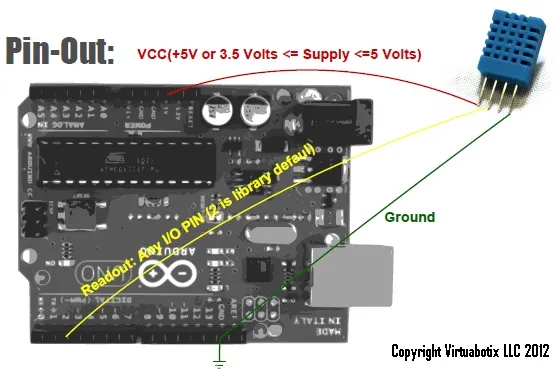
| Pin | Purpose | Details |
|---|---|---|
| Vdd | Provides power to the device (works with 3.3 V or 5 V) | Regulated Power (leftmost pin) |
| Readout | Allows reading of sensor data through PWM train | Second to leftmost pin (directly to the right of the Vdd pin) |
| NC | Not Connected | Do not connect to second from rightmost pin |
| Gnd | Common ground | Right most pin |
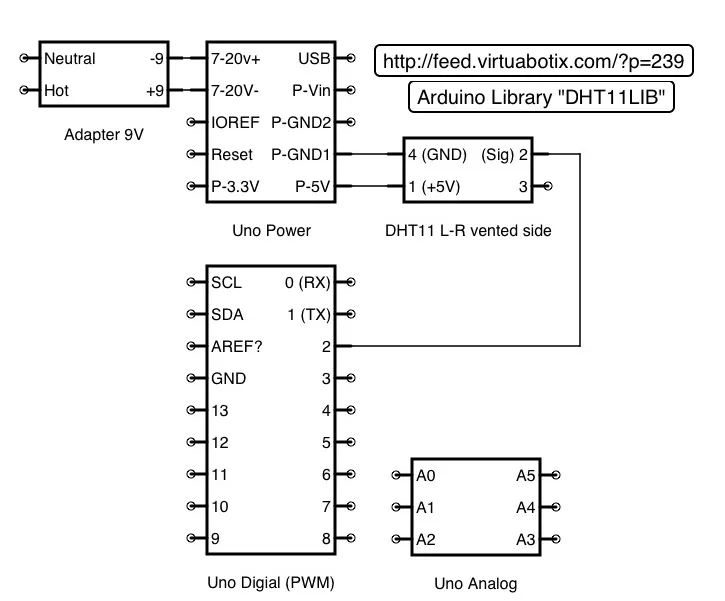
Here is an awesome wiring diagram provided by Matt.
Everyone else puts a pullup resistor on the data pin, why don’t you?
Contrary to popular belief a pull-up resistor is not required for the DHT11 or DHT22 to work with our libraries.
Yes other websites, libraries, and datasheets all indicate the use of a pullup resistor; however we don’t like adding extra cost to your projects so we made the needed adjustments to ensure that the DHT11 and DHT22 both worked without the pullup with our libraries.
The Pullup resistor is a hardware solution to a software solvable problem.
If however you want to use the pullup resistor anyways here is a link to some code, and detailed information about how to work with one. Checkout this article by Embedded Lab if you still want to use a pullup
My DHT11 Readings seem to be off, how can I improve them?
Over time (or in extreme environments) your DHT sensor can become saturated which makes the readings inaccurate. If you think you are having this problem following the procedure below has worked well for other DHT owners:
Step one: Keep the DHT sensor at 50~60 degrees Celsius and less than 10% humidity for 2 hours;
Step two: Keep the DHT sensor at 20~30 degrees Celsius and greater than 70% humidity (do not submerge) for 5 hours.
Following this procedure your DHT11 should give you much better readings.
Arduino™/Versalino™ Libraries & Projects
Libraries
DHT11 Temperature & Humidity Sensor Library
Version 2S0A was released 27 May 2012 and is available for download. Download the DHT11 Library.
Guides
“Simplest” Possible Code (Short answer: Just use the library)
If you are not a fan of Arduino Libraries, and you don’t need all the features you can just use this simple function to read out data from the DHT11. You may be disappointed by the level of complexity of this code, but one wire digital communication isn’t as simple some other technologies. I strongly recommend that you simply take advantage of the library that we have written since it handles all of the communication and verification automatically, but if you are curious this is the meat and potatoes of the program.
int humidity=0; //this is where our humidity will be stored
int temperature=0;//this is where our temperature will be store
//pass function the pin you want to read from
//it will return one of the following codes:
// 0 : OK
//on occasion you will get a checksum or timeout error but giving
//it another read attempt will usually resolve the problem.
// -1 : checksum error
// -2 : timeout
int read(int pin)
{
 // BUFFER TO RECEIVE
 uint8_t bits[5];
 uint8_t cnt = 7;
 uint8_t idx = 0;
 // EMPTY BUFFER
 for (int i=0; i<5; i++)
   bits[i]=0;
 // REQUEST SAMPLE
 pinMode(pin, OUTPUT);
 digitalWrite(pin, LOW);
 delay(18);
 digitalWrite(pin, HIGH);
 delayMicroseconds(40);
 pinMode(pin, INPUT);
 // ACKNOWLEDGE or TIMEOUT
 unsigned int loopCnt = 10000;
 while(digitalRead(pin) == LOW)
   if (loopCnt-- == 0) return -2;
 loopCnt = 10000;
 while(digitalRead(pin) == HIGH)
   if (loopCnt-- == 0) return -2;
 // READ OUTPUT - 40 BITS => 5 BYTES or TIMEOUT
 for (int i=0; i<40; i++)
 {
   loopCnt = 10000;
   while(digitalRead(pin) == LOW)
     if (loopCnt-- == 0) return -2;
   unsigned long t = micros();
   loopCnt = 10000;
   while(digitalRead(pin) == HIGH)
     if (loopCnt-- == 0) return -2;
   if ((micros() - t) > 40) bits[idx] |= (1 << cnt);
   if (cnt == 0) // next byte?
   {
     cnt = 7; // restart at MSB
     idx++; // next byte!
   }
   else cnt--;
 }
 // WRITE TO RIGHT VARS
 // as bits[1] and bits[3] are always zero they are omitted in formulas.
 humidity = bits[0];
 temperature = bits[2];
 uint8_t sum = bits[0] + bits[2];
 if (bits[4] != sum) return -1;
 return 0;
}
Projects
Netduino Libraries & Projects
Libraries
Netduino DHT11/22 Sensor Managed Driver
This is some code we found on the Netduino site that claims to work with the DHT11, its functionality still needs to be confirmed.
PIC Libraries & Projects
Libraries
Basic PIC Code for PIC16
Restored from the josephdattilo.com archive — original publish date January 16, 2014, preserved. Lightly cleaned up for the modern site; the words are period-correct. The library is open source (GPL-3.0) with attribution to Joseph Dattilo.